What is Queue Data Structure?
Queue Data Structure is a linear data structure that is open at both ends and the operations are performed in First In First Out (FIFO) order.
We define a queue to be a list in which all additions to the list are made at one end (back of the queue), and all deletions from the list are made at the other end (front of the queue). The element which is first pushed into the order is the first one to be deleted.
FIFO Principle of Queue Data Structure:
A Queue is like a line waiting to purchase tickets, where the first person in line is the first person served. (i.e., First Come First Serve).
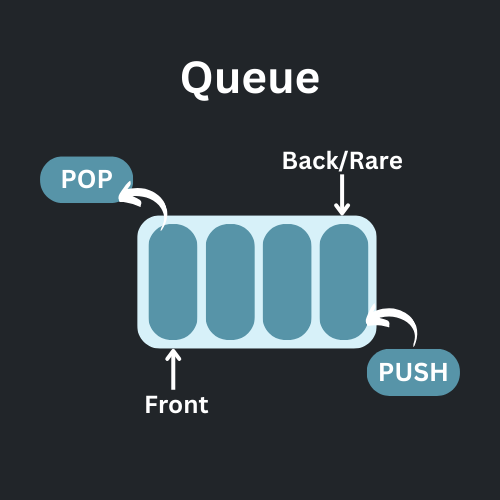
The position of the entry in a queue ready to be served, that is, the first entry that will be removed from the queue, is called the front of the queue (sometimes, the head of the queue). Similarly, the position of the last entry in the queue, that is, the one most recently added, is called the rear (or the tail) of the queue.
Representation of Queue Data Structure:
The image below shows how we represent Queue Data Structure:
Types of Queue Data Structure
Queue data structure can be classified into 4 types:
There are different types of queues:
-
Simple Queue: Simple Queue simply follows FIFO Structure. We can only insert the element at the back and remove the element from the front of the queue.
-
Double-Ended Queue (Dequeue): In a double-ended queue, the insertion and deletion operations can be performed from both ends. They are of two types:
-
Input Restricted Queue: This is a simple queue. In this type of queue, the input can be taken from only one end but deletion can be done from any of the ends.
-
Output Restricted Queue: This is also a simple queue. In this type of queue, the input can be taken from both ends but deletion can be done from only one end.
-
Circular Queue: This is a special type of queue where the last position is connected back to the first position. Here also the operations are performed in FIFO order.
-
Priority Queue: A priority queue is a special queue where the elements are accessed based on the priority assigned to them. They are of two types:
-
Ascending Priority Queue: In Ascending Priority Queue, the elements are arranged in increasing order of their priority values. Element with the smallest priority value is popped first.
-
Descending Priority Queue: In Descending Priority Queue, the elements are arranged in decreasing order of their priority values. Element with the largest priority is popped first.
Basic Operations in Queue Data Structure
Some of the basic operations for Queue in Data Structure are:
- Enqueue: Adds (or stores) an element to the end of the queue.
- Dequeue: Removal of elements from the queue.
- Peek or front: Acquires the data element available at the front node of the queue without deleting it.
- Rear: This operation returns the element at the rear end without removing it.
- isFull: Validates if the queue is full.
- isEmpty: Checks if the queue is empty.
There are a few supporting operations (auxiliary operations):
1. Enqueue Operation in Queue Data Structure:
Enqueue() operation in Queue adds (or stores) an element to the end of the queue. The following steps should be taken to enqueue (insert) data into a queue:
- Check if the queue is full.
- If the queue is full, return overflow error and exit.
- If the queue is not full, increment the rear pointer to point to the next empty space.
- Add the data element to the queue location, where the rear is pointing.
- Return success.
void queueEnqueue(int data) {
    // Check queue is full or not
    if (capacity == rear) {
        printf("\nQueue is full\n");
        return;
    }
    // Insert element at the rear
    else {
        queue[rear] = data;
        rear++;
    }
    return;
}
2. Dequeue Operation in Queue Data Structure:
Removes (or accesses) the first element from the queue. The following steps are taken to perform the dequeue operation:
- Check if the queue is empty.
- If the queue is empty, return the underflow error and exit.
- If the queue is not empty, access the data where the front is pointing.
- Increment the front pointer to point to the next available data element.
- Return success.
void queueDequeue() {
    // If queue is empty
    if (front == rear) {
        printf("\nQueue is empty\n");
        return;
    }
    // Shift all the elements from index 2 till rear to the left by one
    else {
        for (int i = 0; i < rear - 1; i++) {
            queue[i] = queue[i + 1];
        }
        // decrement rear
        rear--;
    }
    return;
}
3. Front Operation in Queue Data Structure:
This operation returns the element at the front end without removing it.
// Function to get front of queue
int front(Queue* queue) {
    if (isempty(queue))
        return INT_MIN;
    return queue->arr[queue->front];
}
4. Rear Operation in Queue Data Structure:
This operation returns the element at the rear end without removing it.
int rear(queue& myQueue) {
    queue tempQueue = myQueue;
    while (tempQueue.size() > 1) {
        tempQueue.pop();
    }
    return tempQueue.front();
}
5. isEmpty Operation in Queue Data Structure:
This operation returns a boolean value that indicates whether the queue is empty or not.
// This function will check whether the queue is empty or not:
bool isEmpty() {
    if (front == -1)
        return true;
    else
        return false;
}
6. isFull Operation in Queue Data Structure:
This operation returns a boolean value that indicates whether the queue is full or not.
// This function will check whether the queue is full or not.
bool isFull() {
    if (front == 0 && rear == MAX_SIZE - 1) {
        return true;
    }
    return false;
}
Implementation of Queue Data Structure
Queue can be implemented using the following data structures:
- Implementation of Queue using Arrays
- Implementation of Queue using Linked List
Array Implementation Of Queue:
For implementing a queue, we need to keep track of two indices, front and rear. We enqueue an item at the rear and dequeue an item from the front. If we simply increment front and rear indices, then there may be problems if the front reaches the end of the array. The solution to this problem is to increase front and rear in a circular manner.
Steps for Enqueue:
- Check if the queue is full.
- If full, print overflow and exit.
- If the queue is not full, increment the rear and add the element.
Steps for Dequeue:
- Check if the queue is empty.
- If empty, print underflow and exit.
- If not empty, print the element at the front and increment the front.
Below is a program to implement the above operations on a queue:
// CPP program for array implementation of queue
#include <bits/stdc++.h>
using namespace std;

// A structure to represent a queue
class Queue {
public:
  int front, rear, size;
  unsigned capacity;
  int* array;
};

// Function to create a queue of given capacity. It initializes size of queue as 0
Queue* createQueue(unsigned capacity) {
  Queue* queue = new Queue();
  queue->capacity = capacity;
  queue->front = queue->size = 0;

  // This is important, see the enqueue
  queue->rear = capacity - 1;
  queue->array = new int[queue->capacity];
  return queue;
}

// Queue is full when size becomes equal to the capacity
int isFull(Queue* queue) {
  return (queue->size == queue->capacity);
}

// Queue is empty when size is 0
int isEmpty(Queue* queue) {
  return (queue->size == 0);
}

// Function to add an item to the queue. It changes rear and size
void enqueue(Queue* queue, int item) {
  if (isFull(queue))
      return;
  queue->rear = (queue->rear + 1) % queue->capacity;
  queue->array[queue->rear] = item;
  queue->size = queue->size + 1;
  cout << item << " enqueued to queue\n";
}

// Function to remove an item from queue. It changes front and size
int dequeue(Queue* queue) {
  if (isEmpty(queue))
      return INT_MIN;
  int item = queue->array[queue->front];
  queue->front = (queue->front + 1) % queue->capacity;
  queue->size = queue->size - 1;
  return item;
}

// Function to get front of queue
int front(Queue* queue) {
  if (isEmpty(queue))
      return INT_MIN;
  return queue->array[queue->front];
}

// Function to get rear of queue
int rear(Queue* queue) {
  if (isEmpty(queue))
      return INT_MIN;
  return queue->array[queue->rear];
}

// Driver code
int main() {
  Queue* queue = createQueue(1000);

  enqueue(queue, 10);
  enqueue(queue, 20);
  enqueue(queue, 30);
  enqueue(queue, 40);

  cout << dequeue(queue) << " dequeued from queue\n";
  cout << "Front item is " << front(queue) << endl;
  cout << "Rear item is " << rear(queue) << endl;

  return 0;
}

// This code is contributed by rathbhupendra
Output:
10 enqueued to queue
20 enqueued to queue
30 enqueued to queue
40 enqueued to queue
10 dequeued from queue
Front item is 20
Rear item is 40
Queue – Linked List Implementation:
In this implementation, we maintain two pointers, front, and rear. The front points to the first item of the queue and rear points to the last item.
Steps for enQueue Operation:
- Initialize QNode* temp with data = x.
- If the rear is set to NULL then set the front and rear to temp and return (Base Case).
- Else set rear next to temp and then move rear to temp.
Steps for deQueue Operation:
- If the front is set to NULL return (Base Case).
- Initialize QNode temp with front and set front to its next.
- If the front is equal to NULL then set the rear to NULL.
- Delete temp from the memory.
Below is the implementation of the above approach:
// C++ program for the above approach
#include <bits/stdc++.h>
using namespace std;

struct QNode {
  int data;
  QNode* next;
  QNode(int d) {
      data = d;
      next = NULL;
  }
};

struct Queue {
  QNode *front, *rear;
  Queue() {
      front = rear = NULL;
  }

  void enQueue(int x) {
      // Create a new LL node
      QNode* temp = new QNode(x);

      // If queue is empty, then new node is front and rear both
      if (rear == NULL) {
          front = rear = temp;
          return;
      }

      // Add the new node at the end of queue and change rear
      rear->next = temp;
      rear = temp;
  }

  // Function to remove a key from given queue q
  void deQueue() {
      // If queue is empty, return NULL.
      if (front == NULL)
          return;

      // Store previous front and move front one node ahead
      QNode* temp = front;
      front = front->next;

      // If front becomes NULL, then change rear also as NULL
      if (front == NULL)
          rear = NULL;

      delete (temp);
  }
};

// Driver code
int main() {
  Queue q;
  q.enQueue(10);
  q.enQueue(20);
  q.deQueue();
  q.deQueue();
  q.enQueue(30);
  q.enQueue(40);
  q.enQueue(50);
  q.deQueue();
  cout << "Queue Front : " << ((q.front != NULL) ? (q.front)->data : -1) << endl;
  cout << "Queue Rear : " << ((q.rear != NULL) ? (q.rear)->data : -1);
}

// This code is contributed by rathbhupendra
Output:
Queue Front : 40
Queue Rear : 50
Complexity Analysis of Operations on Queue Data Structure
| Operations |
Time Complexity |
Space Complexity |
| Enqueue |
O(1) |
O(1) |
| Dequeue |
O(1) |
O(1) |
| Front |
O(1) |
O(1) |
| Back |
O(1) |
O(1) |
| isEmpty |
O(1) |
O(1) |
| isFull |
O(1) |
O(1) |
Applications, Advantages, and Disadvantages of Queue Data Structure
Advantages of Queue Data Structure
- Queue can be used in job scheduling like Printer Spooling.
- Queue can be used where we have a single resource and multiple consumers.
- In a network, a queue is used in devices such as a router/switch and mail queue.
- Queue can be used in various algorithm techniques like Breadth First Search, Topological Sort, etc.
Advantages of Queue Data Structure
- A large amount of data can be managed efficiently with ease.
- Operations such as insertion and deletion can be performed with ease as it follows the first in first out rule.
- Queues are useful when a particular service is used by multiple consumers.
- Queues are fast in speed for data inter-process communication.
- Queues can be used in the implementation of other data structures.
Disadvantages of Queue Data Structure
- The operations such as insertion and deletion of elements from the middle are time consuming.
- Searching an element takes O(N) time.
- Maximum size of a queue must be defined prior in case of array implementation.
Introduction to Circular Queue
A Circular Queue is an extended version of a normal queue where the last element of the queue is connected to the first element of the queue forming a circle. The operations are performed based on FIFO (First In First Out) principle. It is also called ‘Ring Buffer’.
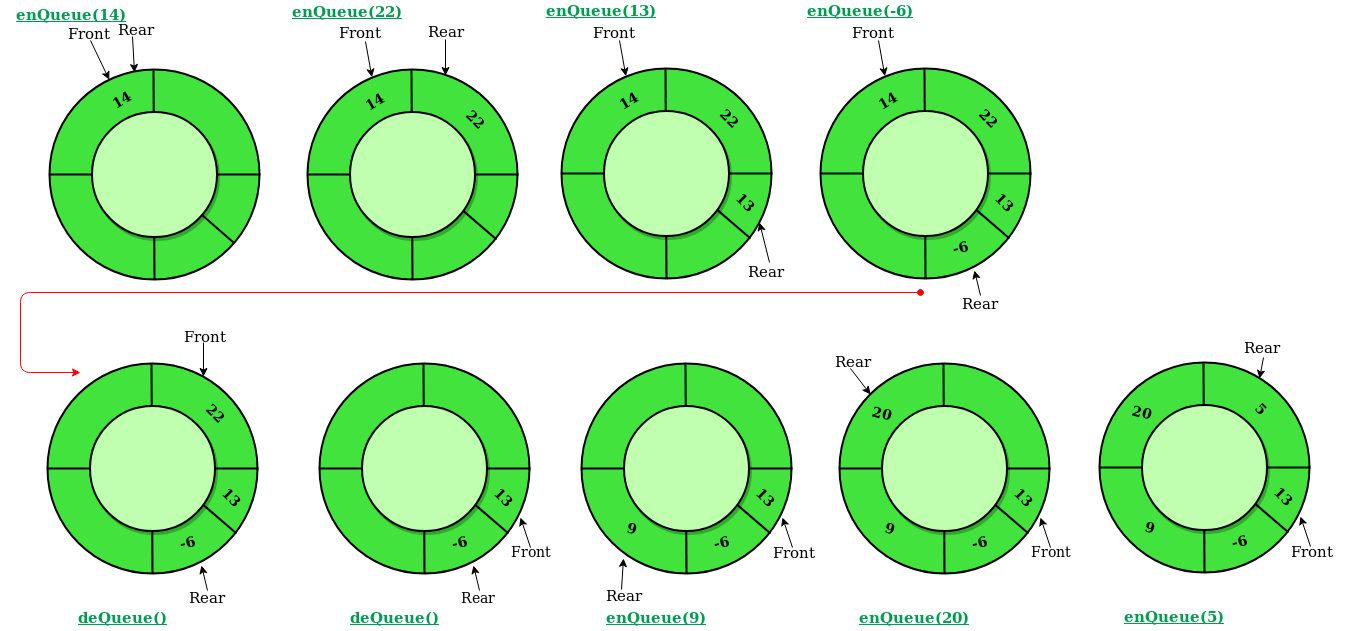
Operations on Circular Queue:
- Front: Get the front item from the queue.
- Rear: Get the last item from the queue.
- enQueue(value): Insert an element into the circular queue. If the queue is full, display an error.
- deQueue(): Delete an element from the circular queue. If the queue is empty, display an error.
How to Implement a Circular Queue?
A circular queue can be implemented using an array data structure. Below is the implementation:
// C or C++ program for insertion and
// deletion in Circular Queue
#include<bits/stdc++.h>
using namespace std;

class Queue
{
  // Initialize front and rear
  int rear, front;

  // Circular Queue
  int size;
  int *arr;
public:
  Queue(int s)
  {
     front = rear = -1;
     size = s;
     arr = new int[s];
  }

  void enQueue(int value);
  int deQueue();
  void displayQueue();
};


/* Function to create Circular queue */
void Queue::enQueue(int value)
{
  if ((front == 0 && rear == size-1) ||
          ((rear+1) % size == front))
  {
      printf("\nQueue is Full");
      return;
  }

  else if (front == -1) /* Insert First Element */
  {
      front = rear = 0;
      arr[rear] = value;
  }

  else if (rear == size-1 && front != 0)
  {
      rear = 0;
      arr[rear] = value;
  }

  else
  {
      rear++;
      arr[rear] = value;
  }
}

// Function to delete element from Circular Queue
int Queue::deQueue()
{
  if (front == -1)
  {
      printf("\nQueue is Empty");
      return INT_MIN;
  }

  int data = arr[front];
  arr[front] = -1;
  if (front == rear)
  {
      front = -1;
      rear = -1;
  }
  else if (front == size-1)
      front = 0;
  else
      front++;

  return data;
}

// Function displaying the elements
// of Circular Queue
void Queue::displayQueue()
{
  if (front == -1)
  {
      printf("\nQueue is Empty");
      return;
  }
  printf("\nElements in Circular Queue are: ");
  if (rear >= front)
  {
      for (int i = front; i <= rear; i++)
          printf("%d ",arr[i]);
  }
  else
  {
      for (int i = front; i < size; i++)
          printf("%d ", arr[i]);

      for (int i = 0; i <= rear; i++)
          printf("%d ", arr[i]);
  }
}

/* Driver of the program */
int main()
{
  Queue q(5);

  // Inserting elements in Circular Queue
  q.enQueue(14);
  q.enQueue(22);
  q.enQueue(13);
  q.enQueue(-6);

  // Display elements present in Circular Queue
  q.displayQueue();

  // Deleting elements from Circular Queue
  printf("\nDeleted value = %d", q.deQueue());
  printf("\nDeleted value = %d", q.deQueue());

  q.displayQueue();

  q.enQueue(9);
  q.enQueue(20);
  q.enQueue(5);

  q.displayQueue();

  q.enQueue(20);
  return 0;
}
Complexity Analysis of Circular Queue Operations:
| Operations |
Time Complexity |
Space Complexity |
| enQueue() |
O(1) |
O(1) |
| deQueue() |
O(1) |
O(1) |
| Front |
O(1) |
O(1) |
| Rear |
O(1) |
O(1) |
| isEmpty() |
O(1) |
O(1) |
| isFull() |
O(1) |
O(1) |
Applications of Circular Queue:
- Memory Management: The unused memory locations in the case of ordinary queues can be utilized in circular queues.
- Traffic system: In computer controlled traffic systems, circular queues are used to switch on the traffic lights one by one repeatedly as per the time set.
- CPU Scheduling: Operating systems often maintain a queue of processes that are ready to execute or that are waiting for a particular event to occur.
Introduction to Priority Queue
What is a Priority Queue?
A priority queue is a type of queue that arranges elements based on their priority values. Elements with higher priority values are typically retrieved before elements with lower priority values.
Properties of Priority Queue
- Every item has a priority associated with it.
- An element with high priority is dequeued before an element with low priority.
- If two elements have the same priority, they are served according to their order in the queue.
Types of Priority Queues
- Ascending Order Priority Queue
- Descending Order Priority Queue
Operations of a Priority Queue
insert: Insert an element into the priority queue.delete: Remove an element with the highest priority from the priority queue.peek: Get the highest priority element from the priority queue without removing it.
Implement Priority Queue Using Array
// C++ program to implement Priority Queue
// using Arrays
#include <bits/stdc++.h>
using namespace std;

// Structure for the elements in the
// priority queue
struct item {
    int value;
    int priority;
};

// Store the element of a priority queue
item pr[100000];

// Pointer to the last index
int size = -1;

// Function to insert a new element
// into priority queue
void enqueue(int value, int priority)
{
    // Increase the size
    size++;

    // Insert the element
    pr[size].value = value;
    pr[size].priority = priority;
}

// Function to check the top element
int peek()
{
    int highestPriority = INT_MIN;
    int ind = -1;

    // Check for the element with
    // highest priority
    for (int i = 0; i <= size; i++) {

        // If priority is same choose
        // the element with the
        // highest value
        if (highestPriority == pr[i].priority && ind > -1
            && pr[ind].value < pr[i].value) {
            highestPriority = pr[i].priority;
            ind = i;
        }
        else if (highestPriority < pr[i].priority) {
            highestPriority = pr[i].priority;
            ind = i;
        }
    }

    // Return position of the element
    return ind;
}

// Function to remove the element with
// the highest priority
void dequeue()
{
    // Find the position of the element
    // with highest priority
    int ind = peek();

    // Shift the element one index before
    // from the position of the element
    // with highest priority is found
    for (int i = ind; i < size; i++) {
        pr[i] = pr[i + 1];
    }

    // Decrease the size of the
    // priority queue by one
    size--;
}

// Driver Code
int main()
{
    // Function Call to insert elements
    // as per the priority
    enqueue(10, 2);
    enqueue(14, 4);
    enqueue(16, 4);
    enqueue(12, 3);

    // Stores the top element
    // at the moment
    int ind = peek();

    cout << pr[ind].value << endl;

    // Dequeue the top element
    dequeue();

    // Check the top element
    ind = peek();
    cout << pr[ind].value << endl;

    // Dequeue the top element
    dequeue();

    // Check the top element
    ind = peek();
    cout << pr[ind].value << endl;

    return 0;
}
Implement Priority Queue Using Linked List
// C++ code to implement Priority Queue
// using Linked List
#include <bits/stdc++.h>
using namespace std;

// Node
typedef struct node {
    int data;

    // Lower values indicate
    // higher priority
    int priority;

    struct node* next;

} Node;

// Function to create a new node
Node* newNode(int d, int p)
{
    Node* temp = (Node*)malloc(sizeof(Node));
    temp->data = d;
    temp->priority = p;
    temp->next = NULL;

    return temp;
}

// Return the value at head
int peek(Node** head) { return (*head)->data; }

// Removes the element with the
// highest priority form the list
void pop(Node** head)
{
    Node* temp = *head;
    (*head) = (*head)->next;
    free(temp);
}

// Function to push according to priority
void push(Node** head, int d, int p)
{
    Node* start = (*head);

    // Create new Node
    Node* temp = newNode(d, p);

    // Special Case: The head of list has
    // lesser priority than new node
    if ((*head)->priority < p) {

        // Insert New Node before head
        temp->next = *head;
        (*head) = temp;
    }
    else {

        // Traverse the list and find a
        // position to insert new node
        while (start->next != NULL
               && start->next->priority > p) {
            start = start->next;
        }

        // Either at the ends of the list
        // or at required position
        temp->next = start->next;
        start->next = temp;
    }
}

// Function to check is list is empty
int isEmpty(Node** head) { return (*head) == NULL; }

// Driver code
int main()
{

    // Create a Priority Queue
    // 7->4->5->6
    Node* pq = newNode(4, 1);
    push(&pq, 5, 2);
    push(&pq, 6, 3);
    push(&pq, 7, 0);

    while (!isEmpty(&pq)) {
        cout << " " << peek(&pq);
        pop(&pq);
    }
    return 0;
}
Applications of Priority Queue
- CPU Scheduling
- Graph algorithms like Dijkstra’s shortest path algorithm, Prim’s Minimum Spanning Tree, etc.
- Data compression in Huffman code
- Event-driven simulation such as customers waiting in a queue
Advantages of Priority Queue
- Access elements quickly based on priority
- Dynamic ordering of elements based on changing priorities
- Efficient algorithms implementation
- Used in real-time systems
Disadvantages of Priority Queue
- Complexity compared to simpler data structures
- High memory consumption
- May not be the most efficient for all operations
- Less predictable order of elements
